Send a proposal and get paid
Build a tailored, discounted multi-session offer, send a prospect an unlisted link, and let them accept and pay online, in full or monthly. It turns into a live, fully booked block on its own.
Updated August 11, 2026
A proposal is a priced offer you build for one prospect, usually someone you met
off the platform, and send as a private link. They open it, accept, and pay for
the whole block, in one charge or over a few months. The moment their first
payment clears, the offer becomes a live 1:1 program with every session on the
calendar and the athlete already booked in. You never touch a booking form.
This is the fastest way to turn a conversation (“I run a 12-session retreat, it
is $75 a session”) into money in your account and a schedule that is ready to go.
Before you start
You need Stripe connected. A proposal is paid through Stripe, so if your space
has not finished Stripe setup
yet, the prospect will not be able to pay. Connect it once and every proposal
after that just works.
Build the proposal
Open your Proposals page and choose New proposal. Fill in the offer:
- Who is it for? and Their email so the offer is addressed to them and,
if they need an account, sign-up is prefilled. - Offer title, the name they see at the top, like “12-Session DB/WR Retreat.”
- Number of sessions and Session length, which set how big the block is.
- Which days?, Start date, and Start time, which set the schedule the
block will run on. - Price per session, then an optional Discount type of “Dollars off” or
“Percent off” and a Discount amount. - How do they pay?, either Pay in full or Monthly payments (see
the next section for the monthly options). - A note to the prospect and an Offer expires date if you want the link
to stop working after a while.
As you type a price and discount, a preview shows the discounted price with the
full price struck through and the savings, so you see exactly what they will see.
Choose Save draft when it looks right.
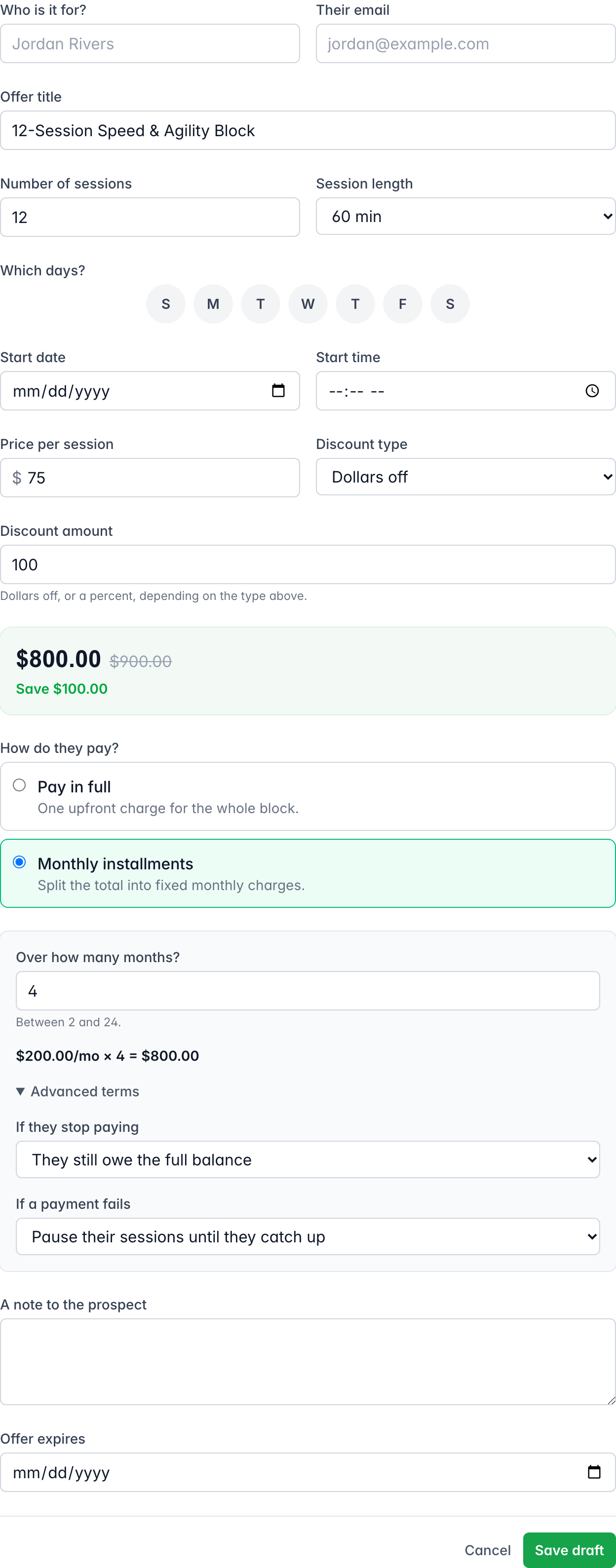
A draft is private and fully editable. Nothing is shared until you send it.
Let them pay monthly
If the whole block is a lot to pay at once, choose Monthly payments under
How do they pay? Set How many payments?, anywhere from 2 to 24, and the
discounted total splits into that many charges. The first payment carries any
leftover cents so the months add up exactly, and every month after is the same.
Billing stops after the last month. There is no auto-renew.
Open Advanced terms to set two policies for the plan:
- If they stop paying: they either still owe the full balance, or they can
cancel and forfeit the sessions they have not paid for. - If a payment fails: you can pause their sessions until they catch up, or
keep them training and send a reminder.
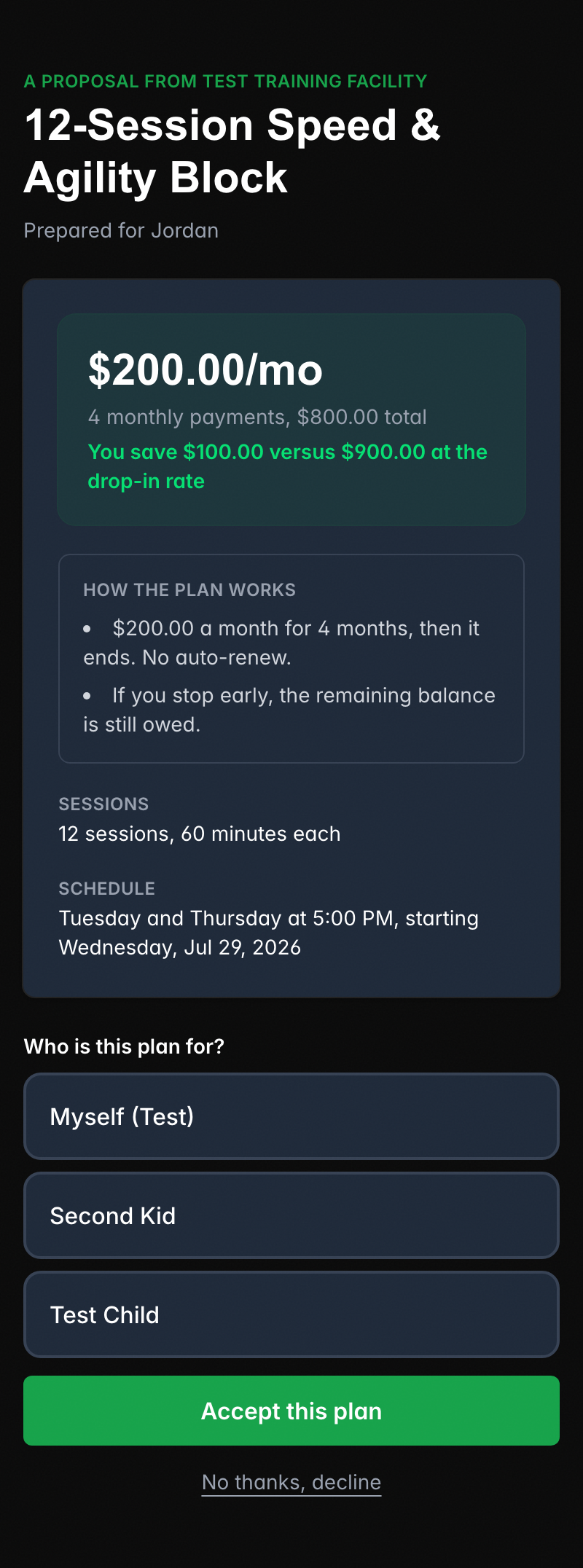
The prospect sees the plan spelled out on the offer, the monthly amount, how many
months, the total, and a short “How the plan works” note, so there are no
surprises.
Send the link
Open the draft and choose Send proposal. This does not email anyone. It
unlocks a Share link section with an unlisted URL and a Copy button.
Paste that link into a text, a DM, or an email of your own. Only someone with the
link can open it.
On the other end, the prospect sees a clean offer page: the title, the discounted
price for the full plan, the schedule, and your note. They can Accept this
plan or decline.
What happens when they accept
When they accept, they sign in or create an account if they need one, then pay
through Stripe, the full price or the first monthly charge. As soon as that
payment confirms, three things happen on their own:
- The offer becomes a live, private 1:1 program built from the schedule you set.
- Every session in the block is created and the athlete is booked into all of
them. - You get one notification, “Proposal accepted,” and the proposal in your list
now links straight to the live program.
Nothing goes live until the payment clears. If someone opens the link and never
pays, no program and no sessions are created, so an abandoned offer leaves your
schedule untouched.
Who the plan is for
A parent can accept a plan on behalf of their child. When they accept, they pick
Who is this plan for? and choose themselves or one of their athletes. The
child lands on your roster as the athlete in every session, while the parent stays
on the payment. Either way you get the same “Proposal accepted” notification and
the same live program.
If they decline or the link goes stale
A decline is quiet by design. The prospect sees a short “you have declined this
offer” note, and you get no notification, so a no does not clutter your inbox.
If the offer has expired, or the link is wrong, the prospect sees a neutral “This
link is no longer valid. Ask your trainer to send you a fresh link.” It never
reveals whether the proposal exists, so an old link you forgot about cannot leak
anything.
Changing a proposal after you send it
A sent proposal is locked so the price cannot move under the prospect. To edit
it, choose Return to draft first. You will be warned that this kills the
current share link, because reverting makes a brand new link. Send it again to
get a fresh link, and pass that one along instead.
Once a proposal is accepted, it is final. It stays in your list linked to the
live program it created, so you always have a record of what was agreed and paid.
Was this helpful?